Can AI Help Configure and Administer a Palo Alto?
That's the question I kept running into. Not "can an LLM explain what a security policy rule is," it can, easily, but "can it actually sit next to a real PAN-OS firewall and help configure and administer it." That's a much harder question, because PAN-OS is notoriously easy to misconfigure, and a firewall is exactly the kind of system where "the AI was probably right" isn't good enough.
There's also no good sandbox for this. No real place to click around the actual GUI, drop into the actual CLI, and get live guidance without risking a production policy. Most people learn PAN-OS the hard way: on a real firewall, under time pressure, hoping they read the documentation correctly.
So the naive version of the question, "should an AI be allowed to run firewall commands," has an easy answer: not unsupervised, not on a production security boundary. Security practitioners are right to be wary of any tool that lets an AI execute firewall changes on its own. But that easy answer ducks the more useful question underneath it: is there a version of AI-assisted firewall administration that a practitioner could actually trust? I built PaloPilot to find out.
What It Does
PaloPilot reverse-proxies a real (or lab) PAN-OS GUI into one browser tab. You work in the actual firewall interface, exactly as you would normally, while an AI chat assistant and a real interactive SSH terminal sit alongside it in the same window.
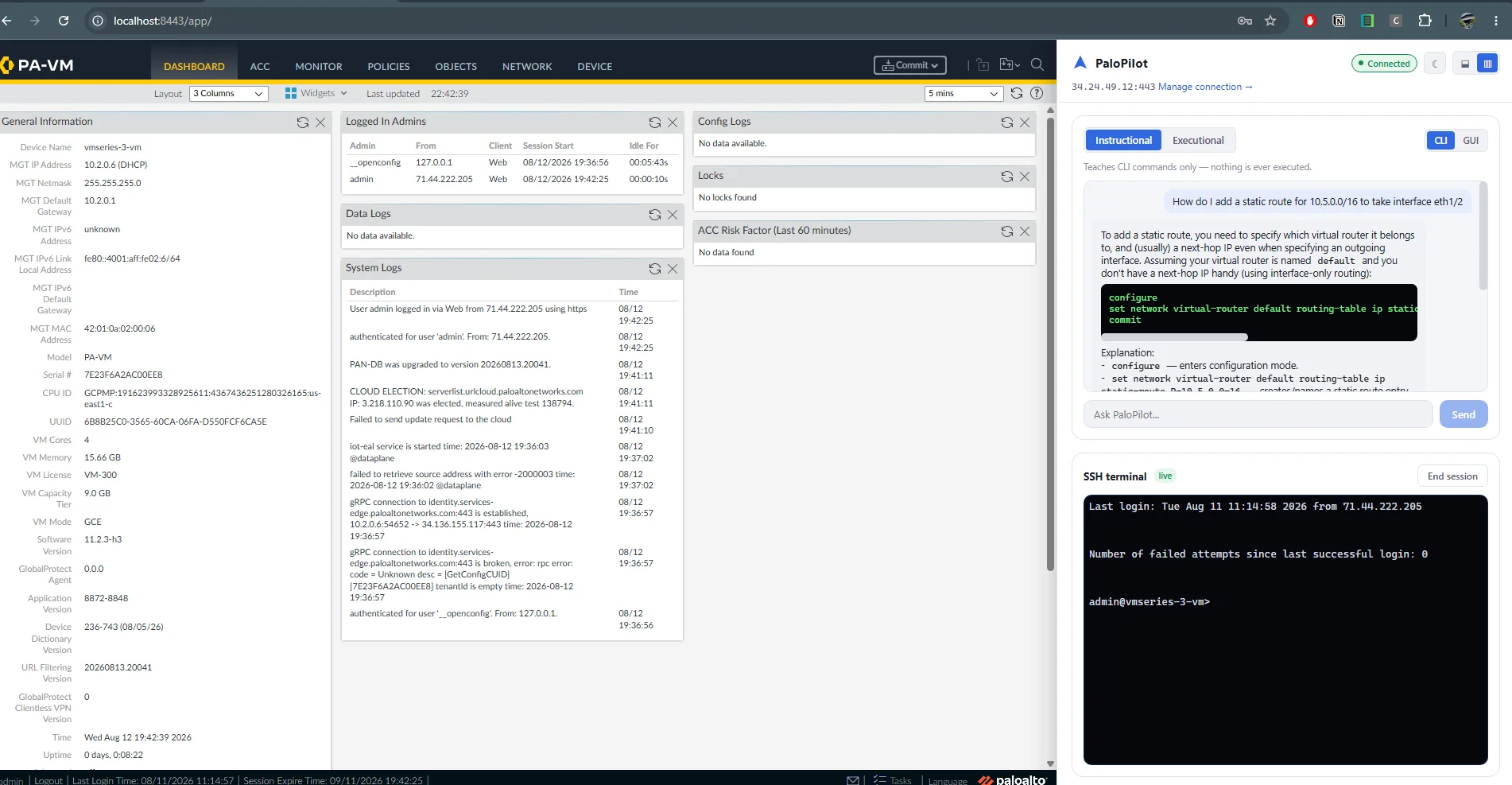
The real PAN-OS dashboard, the PaloPilot chat panel, and a live SSH terminal, all in one tab.
That combination is the whole idea: the real GUI so nothing you learn is fake, a real terminal so you're not restricted to whatever the chat model decides to expose, and an AI assistant that can see what you're doing and help either by teaching or, in a separate mode, by acting.
The Answer Is "It Depends What You Let It Touch"
So, can AI help configure and administer a Palo Alto? PaloPilot's answer is: yes, but only if "help" is allowed to mean two very different things depending on the moment, and the AI is never the one deciding which one applies. PaloPilot supports two interaction modes, and the split between them isn't just a prompt instruction, it's structural.
Instructional mode gives the AI zero tool access. It cannot touch the firewall in any way. It only teaches: exact CLI commands to type, or numbered click-through steps in the GUI. This is the mode for actually learning PAN-OS, with an assistant that explains rather than does.
Executional mode gives the AI real tools to configure the firewall, starting with Address Objects. But even here there are two guardrails to choose from:
- Review — the AI stages a command, shows it to you, and waits for explicit confirmation before running it.
- Cowboy — the AI executes immediately, for trusted, hands-off use.
In either case, PaloPilot only ever stages configuration (set commands).
It never auto-commits. That was a deliberate product decision after early user
feedback: no security practitioner is going to adopt a tool that runs firewall
commands off the bat without asking first.
See It Working
PaloPilot walking through a live PAN-OS session — chat, staged commands, and the real SSH terminal side by side.
Architecture Highlights
- Node.js/TypeScript monorepo (npm workspaces), Claude driving the chat, deployed via Docker Compose.
- A reverse proxy embeds the real PAN-OS GUI through header stripping, CSP rewriting, and HTML/URL rewriting, validated end-to-end against a real lab firewall, including pass-through login.
- A genuine interactive SSH terminal (WebSocket + xterm.js) runs alongside the chat, giving the user a real, unconstrained CLI session on the firewall, not a chat-simulated one.
- All firewall execution, whether chat-driven or manual, goes through SSH. PaloPilot never stores PAN-OS credentials directly: auth is a strict three-way split between pass-through GUI login (never stored), a separately-held API key, and separately-held SSH credentials, encrypted at rest.
- The AI conversation loop is hand-rolled instead of using an SDK's auto-executing tool runner, specifically so Review mode can pause mid-turn for human confirmation before a tool actually fires. Newer work extends this to an in-conversation clarifying-question modal, so the AI can ask the user something and wait for an answer before proceeding.
Notable Problems Along the Way
A few of the harder bugs turned out to be more interesting than the feature work:
- Diagnosed and fixed a subtle
http-proxy-middlewarebug where enablingws: truecaused it to silently double-register on Node's WebSocket upgrade event, corrupting an unrelated terminal WebSocket's frames. - Worked around PAN-OS's JS-based iframe-busting (
window.top.locationredirects) without triggering an infinite reload loop. - Caught a Docker build gotcha where a stale
tsbuildinfofile leaking into the build context madetscsilently no-op: exit 0, zero files emitted.
Status
The core proxy embedding, the SSH terminal, and the chat (Instructional plus Executional in both Review and Cowboy modes) are built and validated against a real firewall. MVP object scope targets Security Policy Rules, Address/Service Objects, and NAT Rules, but only Address Objects are wired up as an executable tool so far. Commit flow, broader object types, and non-chat learning modes are still ahead.